


Buying WordPress hosting looks like a small decision until it isn’t. Pick the wrong host and you spend the next year fighting slow load times, unexpected bills, or a control panel that argues with you every time you want to change something. Pick the right one and you barely think about it again.
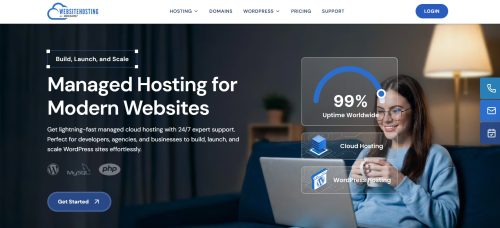
I’ve been building WordPress sites for more than a decade, and I’ve paid my own money to test every big name in the market. Our team at SeekaHost built websitehosting.app, so I’ll be upfront about referencing it throughout.
What I want you to leave with, whether you end up on our platform or not, is a clear checklist of what to actually think about before you click “buy.”
Here are the eight questions I’d walk any friend through before they commit.
1. What Are You Actually Building?
The first honest question.
Are you starting a personal blog?
A small business site?
A WooCommerce store?
A high traffic content site with 50 posts a month?
Each of those has a different right answer.
A personal blog and a portfolio site don’t need enterprise infrastructure. A WooCommerce store needs a real database and dedicated resources. A high traffic content site needs both.
If you don’t know yet, be honest about that too. Starting small and moving up beats overbuying on day one and paying for capacity you don’t use.
How this maps to your host choice: You want a platform that offers both shared WordPress hosting for smaller sites and cloud VPS tiers for larger ones, so you don’t have to migrate when you grow. On websitehosting.app, both live in the same portal, and moving between them doesn’t require rebuilding your DNS.
2. How Much Traffic Do You Actually Expect?
Not vanity traffic. Real traffic. Look at your Google Analytics if you already have a site, or be conservative if you don’t. Most new WordPress sites are getting under 5,000 visitors a month for the first year.
That’s fine. That’s normal. Don’t buy hosting for the traffic you dream about, buy it for the traffic you’ll actually get in the next six months.
If you’re realistic here, you save real money. Shared WordPress plans on any decent host can absorb 5,000 to 25,000 monthly visitors without issue. Once you’re consistently past that, you’re ready for a cloud VPS.
How this maps to your host choice: Look for a host that clearly explains their traffic ceilings and doesn’t punish you for exceeding them with sudden overage bills. websitehosting.app is built to scale without surprise invoices, and moving from a shared plan to a cloud VPS is a click, not a migration project.
3. Where Are Your Readers Actually Based?
Hosting location matters more than most first time buyers realise. Every 100ms of latency between your server and your reader shows up in your load times, your Core Web Vitals, and eventually your Google rankings.
If your audience is mostly in the UK and Europe, hosting in London or a European city is a real advantage. If your audience is US based, you want an East Coast or West Coast data centre. If you’re global, you want a host with more than one region so you can at least be close to your biggest market.
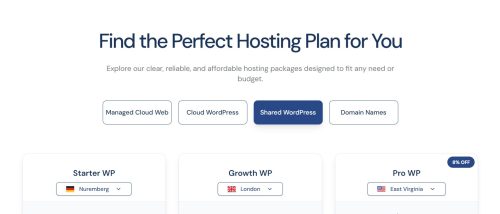
How this maps to your host choice: websitehosting.app offers three regions: Nuremberg, East Virginia, and London. For a UK blog, London is the default. For a US business site, East Virginia. For European content sites, Nuremberg is well positioned.
4. What’s Your Real Monthly Budget, Including Everything?
The advertised price and the real price are almost never the same.
Before you buy, add up:
- The base hosting plan
- Domain registration and renewal
- SSL certificate (should be free, but check)
- Email hosting (Google Workspace is around $6 per user per month if it’s not included)
- Backup fees (some hosts charge for these)
- Traffic overage fees (Kinsta and WP Engine bill you for exceeding your visit cap)
That $10 a month plan sometimes turns into $40 a month once you add the pieces you actually need to run a site.
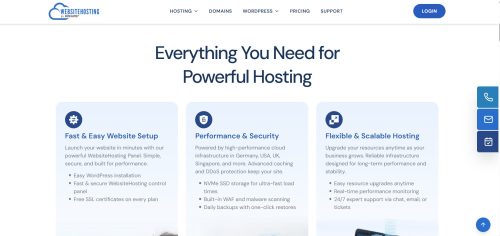
How this maps to your host choice: Look for a host that includes SSL, doesn’t charge overages, and either includes email hosting or makes it cheap to add. websitehosting.app bundles the essentials into one bill in your local currency, and there are no surprise line items.
For a deeper look at real pricing, Better Managed WordPress Hosting in 2026 with Cheaper Prices by SeekaHost breaks down what each of the big managed hosts actually costs once you’re honest about the extras.
5. How Comfortable Are You With Technical Setup?
Be honest with yourself. Are you the kind of person who enjoys tinkering with server configuration, or would you rather never see a command line?
If you’re comfortable with a control panel, you have more options. If you’re not, you need a genuinely managed platform. And “managed” means different things at different hosts.
Cloudways is technically managed but it expects you to pick your server size, configure your PHP workers, and understand what a droplet is. Ionos is technically managed too, but the WordPress hosting experience there is genuinely confusing for a first time buyer.
How this maps to your host choice: Look for a host where launching a WordPress site is a click, not a project. websitehosting.app was built specifically so bloggers, founders, and business owners can go live without ever touching a server console. Log in, search a domain, pick a plan, click install, done.
6. How Fast Do You Actually Need It to Load?
Speed matters for every WordPress site, but the level of investment worth making depends on what you’re doing. For a personal blog, “fast enough” means under two seconds to load on a phone. That’s achievable on any well tuned shared WordPress plan.
For a WooCommerce store or a lead generation business site, every 100ms matters because it changes your conversion rate and your Google ranking. For a high traffic content site, you need consistent speed under load, which is where a proper cloud VPS starts to matter.
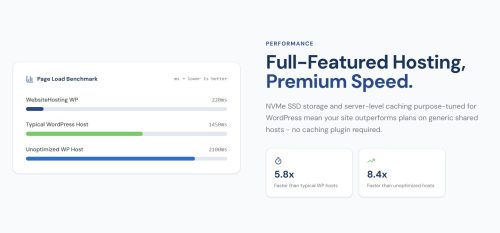
How this maps to your host choice: Look for NVMe SSD storage (not SATA), WordPress tuned server images, and data centres close to your audience. websitehosting.app runs on NVMe across every plan, ships WordPress ready environments, and lets you pick your region. Deeper detail on the speed setup is in Superfast Managed Cloud WordPress Hosting on websitehosting.app.
7. What Does “Managed” Actually Mean at This Host?
This is the trick question of the WordPress hosting market. Every host calls itself managed. Very few actually manage the WordPress specific work for you.
The questions to ask:
- Are WordPress security patches applied automatically?
- Is the caching layer configured and tuned for WordPress out of the box?
- Are backups included and automatic?
- Is SSL provisioned and renewed automatically?
- If PHP versions need to change, does the host handle it, or do you?
If the answer to all of those is yes, it’s genuinely managed. If you’re doing any of those yourself, the “managed” label is marketing.
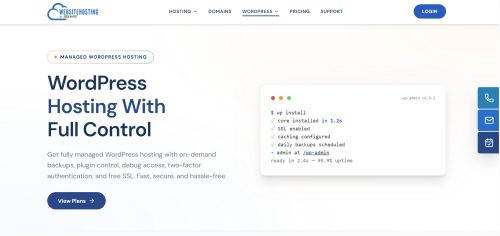
How this maps to your host choice: websitehosting.app is built to handle all of the above at the platform level. You focus on writing, running your business, or building your product. The platform handles WordPress.
8. Where Does This Platform Go When You Grow?
Every WordPress site owner underestimates how much they’ll grow. The bloggers I know who started small five years ago are now running businesses. Their hosting had to grow with them, and the ones on platforms with no clear scaling path spent a lot of pain migrating.
Before you buy, look at the growth ceiling. Can you go from shared hosting to cloud VPS on the same platform? Can you add more sites without opening new accounts? If your traffic doubles, do you have somewhere to move that doesn’t require a full migration?
How this maps to your host choice: websitehosting.app is built specifically so you can start on a shared WordPress plan for a personal blog or small business site, and move to cloud VPS in the same portal when you’re ready. Same login, same file manager, same domain, same billing. Nothing to rebuild.
Putting It Together
If I had to distill this into a decision framework, it’s three questions.
What kind of site am I building, and how much traffic will it actually see in the next six months? That answers whether you need shared or cloud VPS.
What’s my real budget once I include SSL, email, and overages? That filters out the hosts pretending to be cheap.
Do I want to manage a control panel, or do I want the platform to handle WordPress for me? That filters out anyone calling themselves “managed” who isn’t.
For most bloggers, startups, and small business site owners, the honest answers are a shared WordPress plan to start, real budget of £5 to £20 a month, and yes I want the platform to handle WordPress for me. That’s exactly what websitehosting.app was built for.
If you’re launching a new WordPress site this weekend, Your Name Deserves Its Own Home Online is my full walkthrough for the whole first weekend.
Once you’re live, How to Submit Your WordPress Blog to Google Search Console and Google Analytics covers what to do next.
The point of this article isn’t to sell you anything. It’s to make sure you buy hosting with your eyes open. Ask the eight questions above of any host you’re considering. Whichever platform gives you the most honest answers deserves your money.